08. Structure Site to Make Navigation Easy
In the last section, we learned best practices for creating a unique address for a web page. Now we will focus on determining where that page best lives on your site.
When we discussed URLs, we suggested following a directory structure. Usually your directory structure aligns with the structure of your website and is important because it helps people navigate your site.
A well structured site not only helps people find the content they need, but also helps search engines to find and categorize all the content.
A. Follow a directory structure
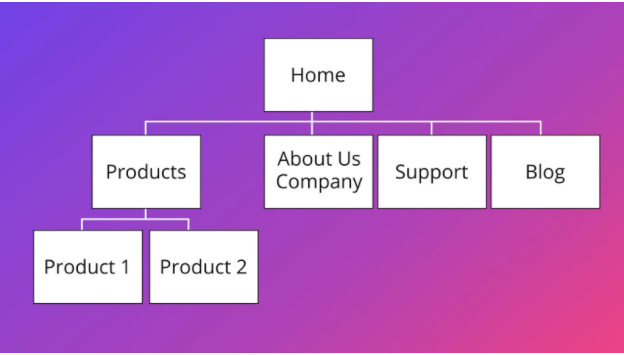
When adding pages to your site, it is always a good idea to keep an overall sketch in mind of the structure of your site and to follow a directory or waterfall structure, starting with your homepage. At a very high level, this could look something like this:
Let’s take a look at a well structured site. For instance: Warby Parker. They sell glasses and sunglasses.
Starting from the home page, the structure looks something like this:
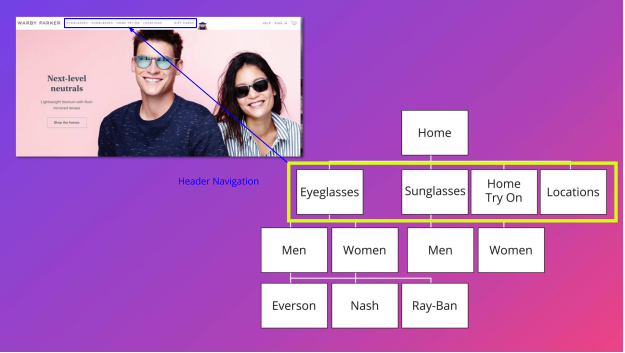
The site has a section with eyeglasses, one with sunglasses, one with more info on home try-on, one with locations, their story etc. This we call Header Navigation or Main Navigation.
From there you can navigate deeper into each of those areas, and every page neatly fits the broader structure.
Determining where you would like your new content or page to fit within your existing website structure, logically, will help influence not only how you want to structure your site, but also where any new additional pages will live once they are created.
B. Leave breadcrumbs
One helpful way to orient users is to leave what are called ‘breadcrumbs’
Breadcrumbs: Are a trail that displays each page viewed by the visitor of the site.
For example, in the product page below, the breadcrumbs show that we started on Eyeglasses, navigated to the Women’s section and we are currently on a product page for a product named “Goodney.”

Breadcrumbs are a helpful way for the user to find the way back to the root or the homepage, and provides search engines with context when arriving on a page.
C. Provide internal links for all pages
As we saw, search engines need help getting from one page to the next, and they navigate by following links. Websites help search engines to follow their structure using Internal Linking.
Internal Linking is building links from one page to another within the same domain.
An internal link is a text link from one page of your site to another. The directory structure you created for your site will help you to set up internal links on all the pages, so users as well as search engines can navigate deeper into your site and find all the pages of your site. You want to make sure that all pages are linked to each other, and you should use text for the links that reflects what users will find on the next page when they click the link.
The internal links help establish the information hierarchy for a website. The optimal structure for a website looks similar to a pyramid where the top represents the homepage, like in this example:
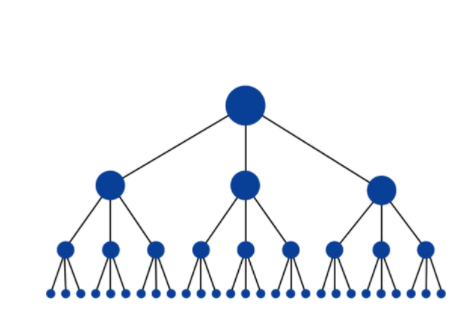
All your pages should be connected through links if you want the search bots to find them. That includes any new content you add. A solid site structure will help you with that.
Any disconnected page, what we sometimes refer to as an “orphaned page”, won’t be accessible to the search bot, and it won’t be indexed.
It’s a common mistake to bury new pages in the site where a search engine spider has no way of reaching them - or even determining that the pages exist because there is not a direct, crawlable link that points to the page. Make sure to avoid that!